MUSE Ecosystem · Gothic Grandma LLC
GLYPH
Unified Internal WorkbenchWhat Problem It Solves
Building MUSE requires constant context-switching between languages (C++, Go, Python, TypeScript), runtimes (native, Node, Python), and workflows (simulation design, debugging, content authoring, research). Each role—system engineer, researcher, creative director—needs a completely different toolset, but they all work against the same data and the same engine.
GLYPH is a single Electron workbench that serves all internal roles. Each user saves their own layout preset with the panels they need. The underlying backend, schema, and panel system are shared. There's no context-switching between apps—only between layouts.
How It Works
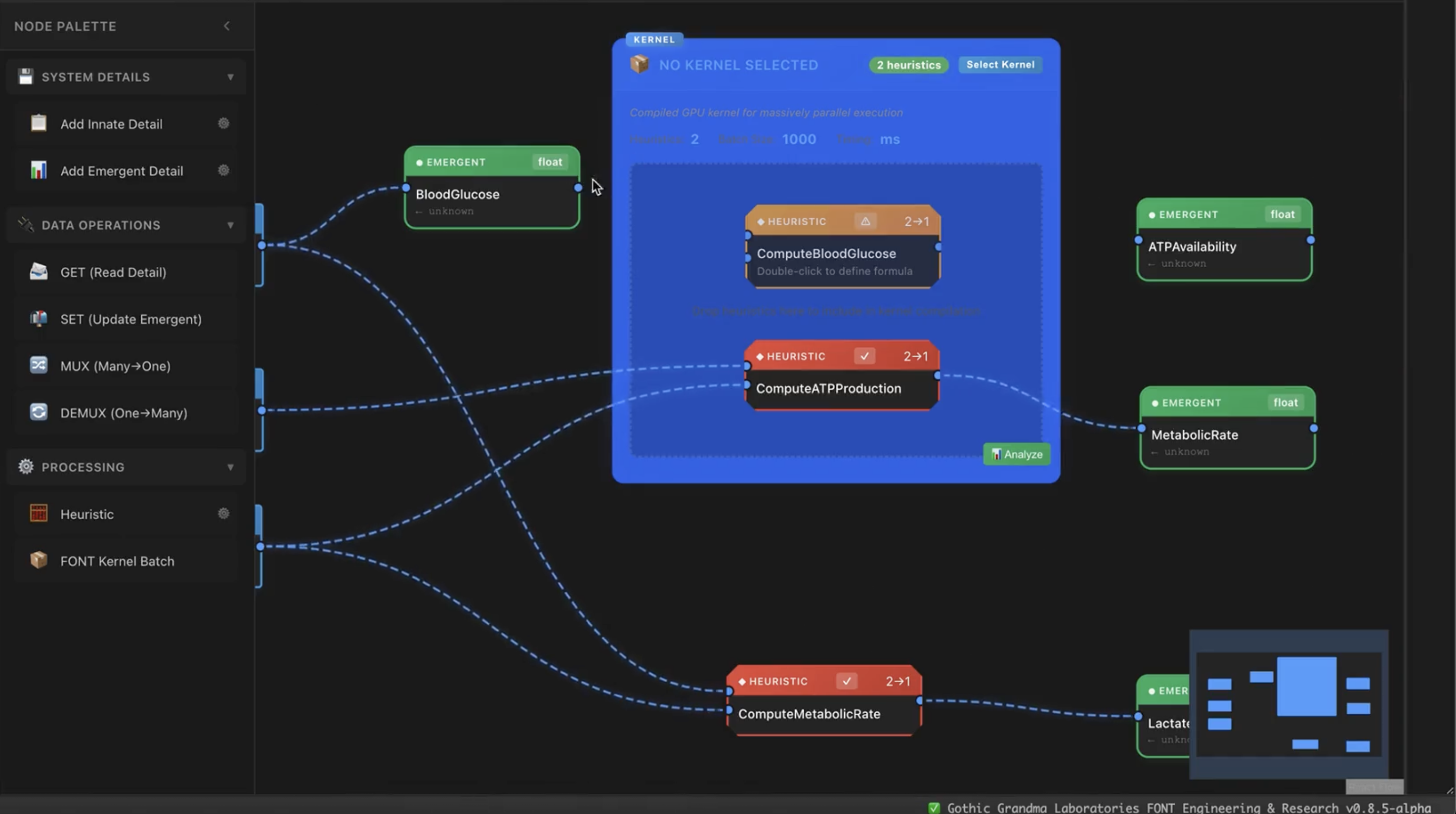
Visual Kernel Engineering — Constructor, Inspector, Performance
- Constructor — visual system builder using TESSERA (embedded React Flow iframe). Node graphs define entity details, heuristics, and kernel batches. Designs save directly to the schema database.
- Visual → Schema → C++ kernels — graphs compile to SQLite/PostgreSQL definitions; GESTALT generates optimized C++ kernel source; native compilation produces CUDA/Metal/Vulkan/CPU binaries
- Inspector — deep entity and system inspection with Bayesian belief viewing at runtime
- Performance — FPS monitoring, entity counts, per-kernel execution timing
- Scientific formulas — visual expression builder supports sigmoid, gaussian, Hill equation, Michaelis-Menten, exponential decay, attention weighting, belief updating, noise injection
AI-Augmented Development — Chronicle Terminal, SIBYL, Session Tracking
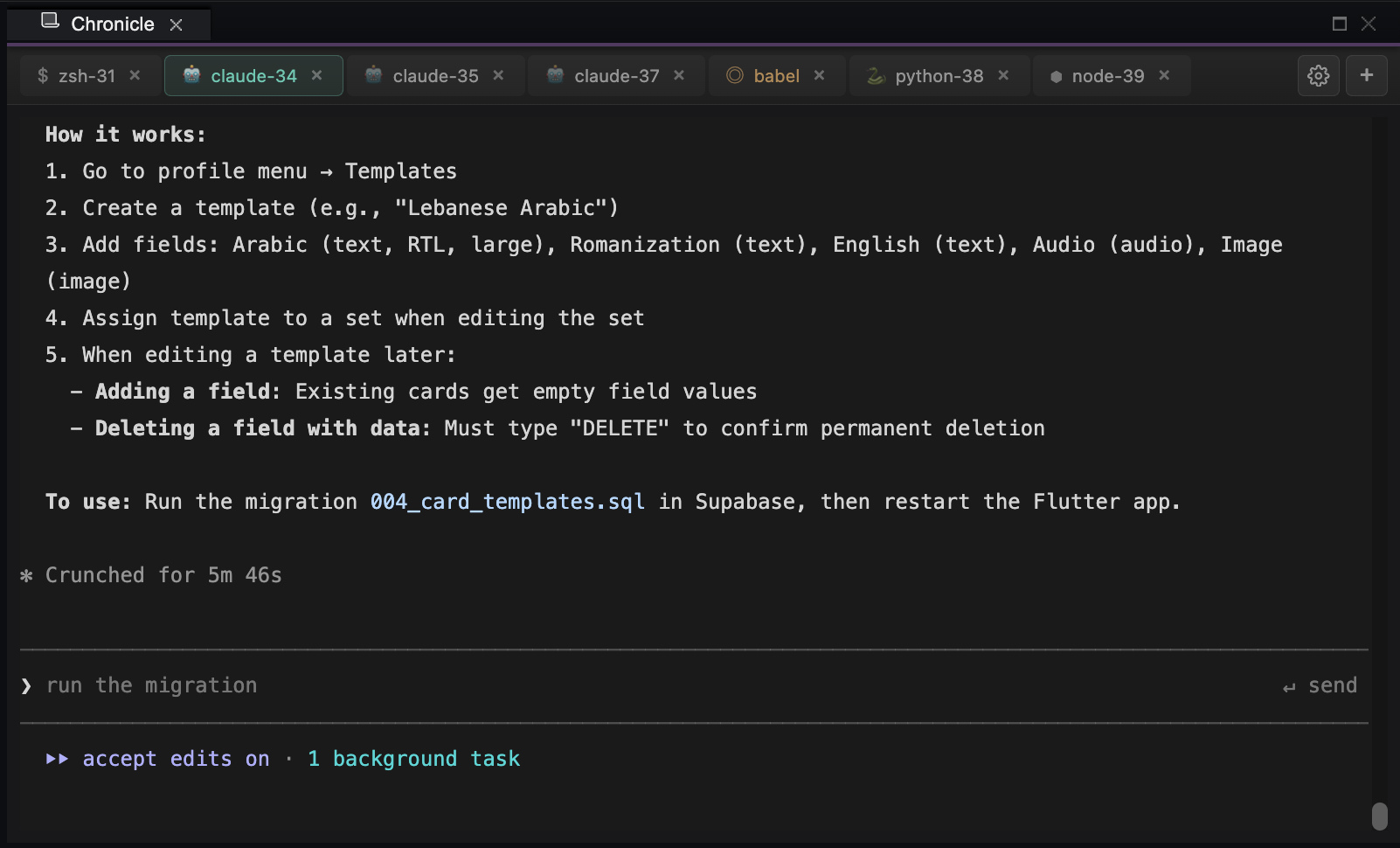
- Chronicle Terminal — persistent tmux terminals that survive restarts; zsh, Python REPL, Node.js, and Claude Code all in one interface. Context menu captures output as Todo, Insight, Decision, or Plan.
- Claude Code integration — Claude Code runs from within the Chronicle terminal with full codebase context and session-aware state
- SIBYL static analysis — Python scripts parse C++, Go, Python, TypeScript, Dart, and SQL across the codebase. Results write to SQLite for querying. Feeds Architecture Explorer, Obsolete Detector, and API Documentation panels.
- Session tracking — captures goals, accomplishments, and blockers. Timeline panel provides chronological view of all activity across todos, sessions, insights, and decisions.
- Knowledge Base — searchable insights, patterns, and common fixes rated by importance (1–10)
Focus Mode — Shift+Cmd+F to Maximize Any Panel
Press Shift+Cmd+F to maximize the panel under your cursor. Same shortcut or Escape to restore. Works across every panel—terminal, Constructor, editor, documentation—without losing layout context.
Content Authoring — Entity Builder, Templates, World Data
- Entity builder — visual interface for creating characters, environments, items, and relationships without writing code
- Template system — define archetypes once and instantiate across a world
- BABEL integration — BABEL semantic layer translates natural language to FONT commands and schema changes
- No-code authoring — creators set biological and psychological parameters via descriptive interfaces backed by the same schema system engineers use
Research Panels — BABEL Analysis, Database Explorer, Architecture
- BABEL — AI-assisted analysis with 6 specialized modes including system design guidance and biological model explanation
- Database Explorer — multi-database SQL editor against both Supabase (PostgreSQL) and SQLite schemas
- Architecture Explorer — dependency graph visualization (force/tree/layered views) of the full codebase and FONT component relationships
Role-Based Permissions with Admin Controls
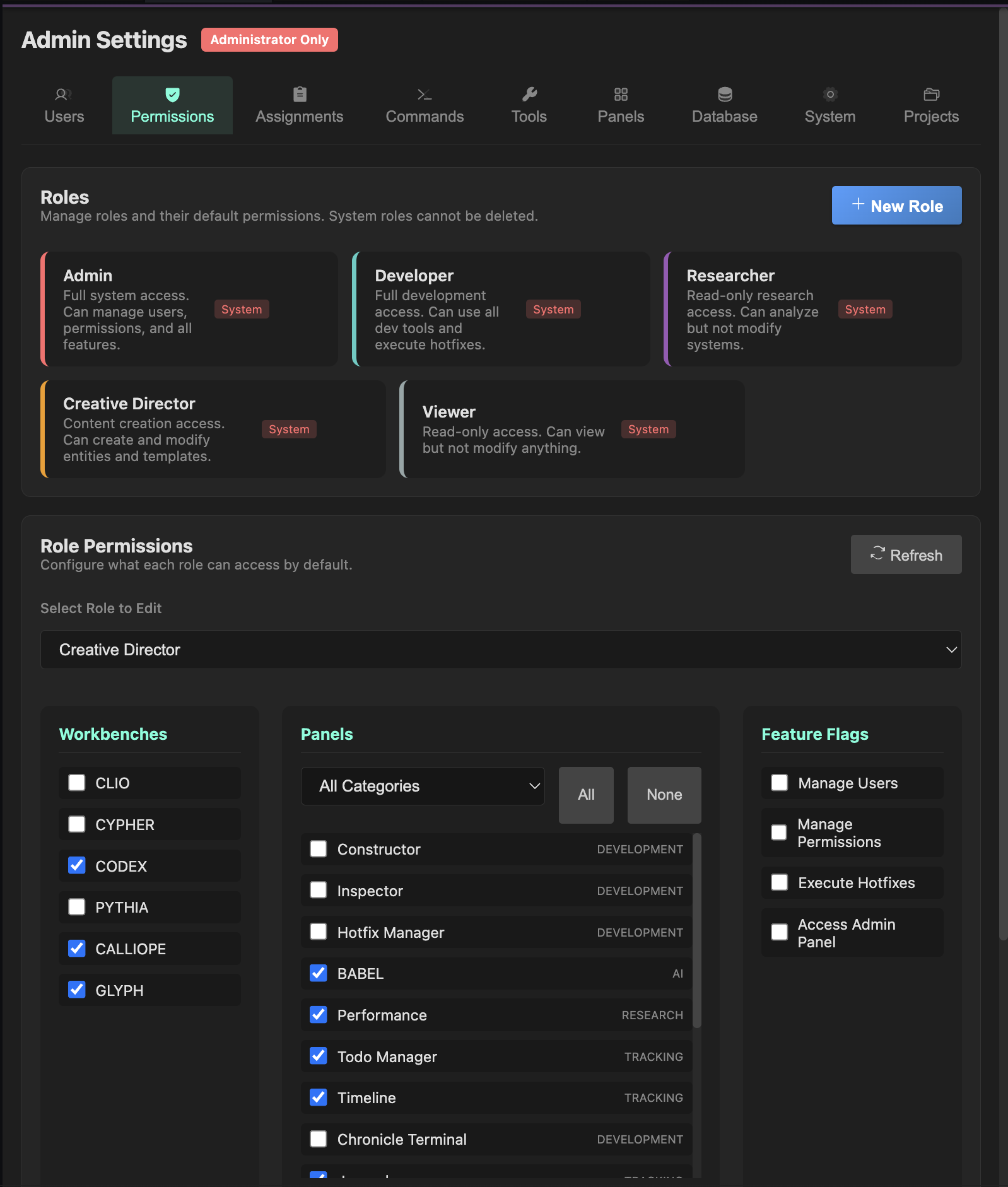
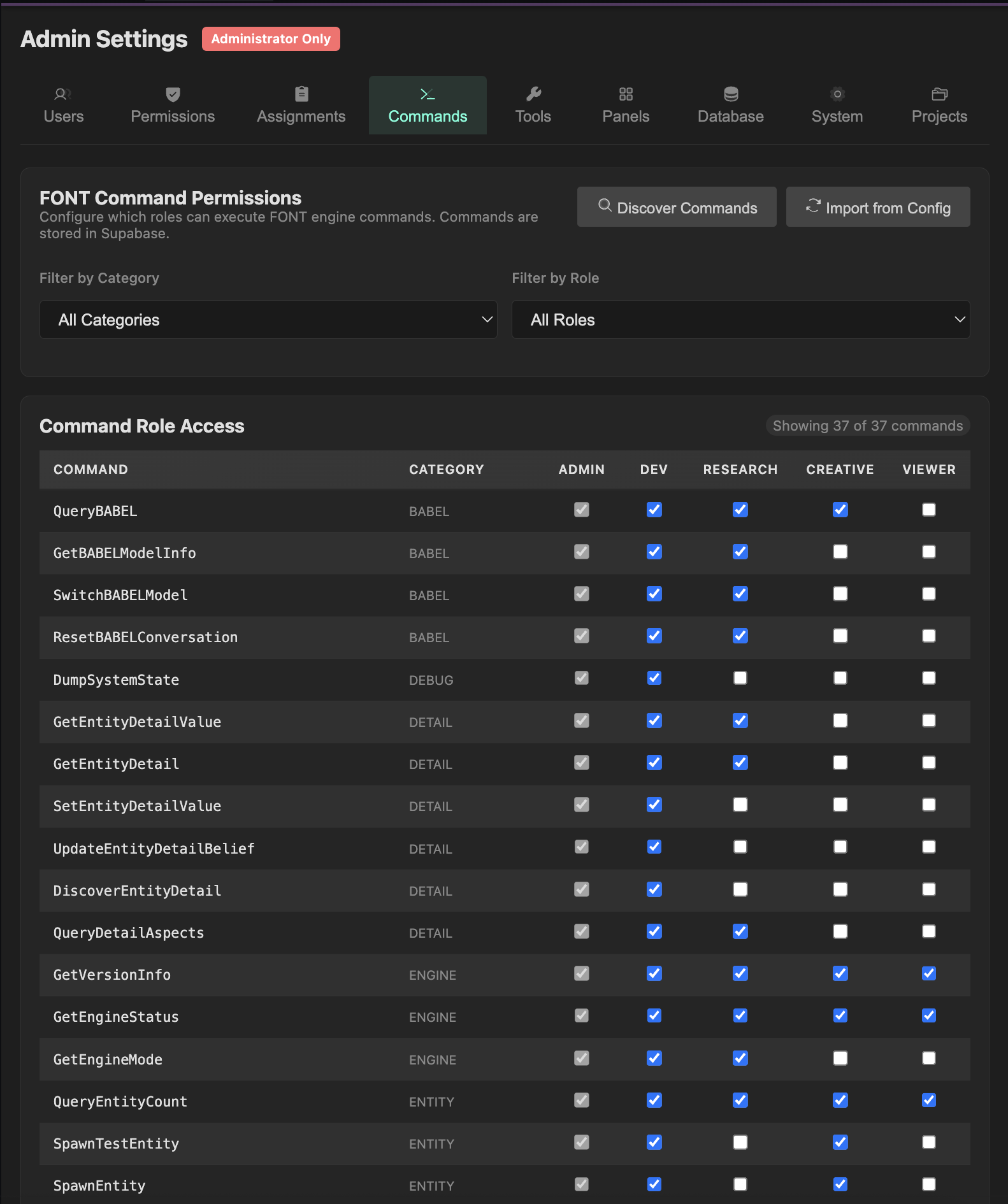
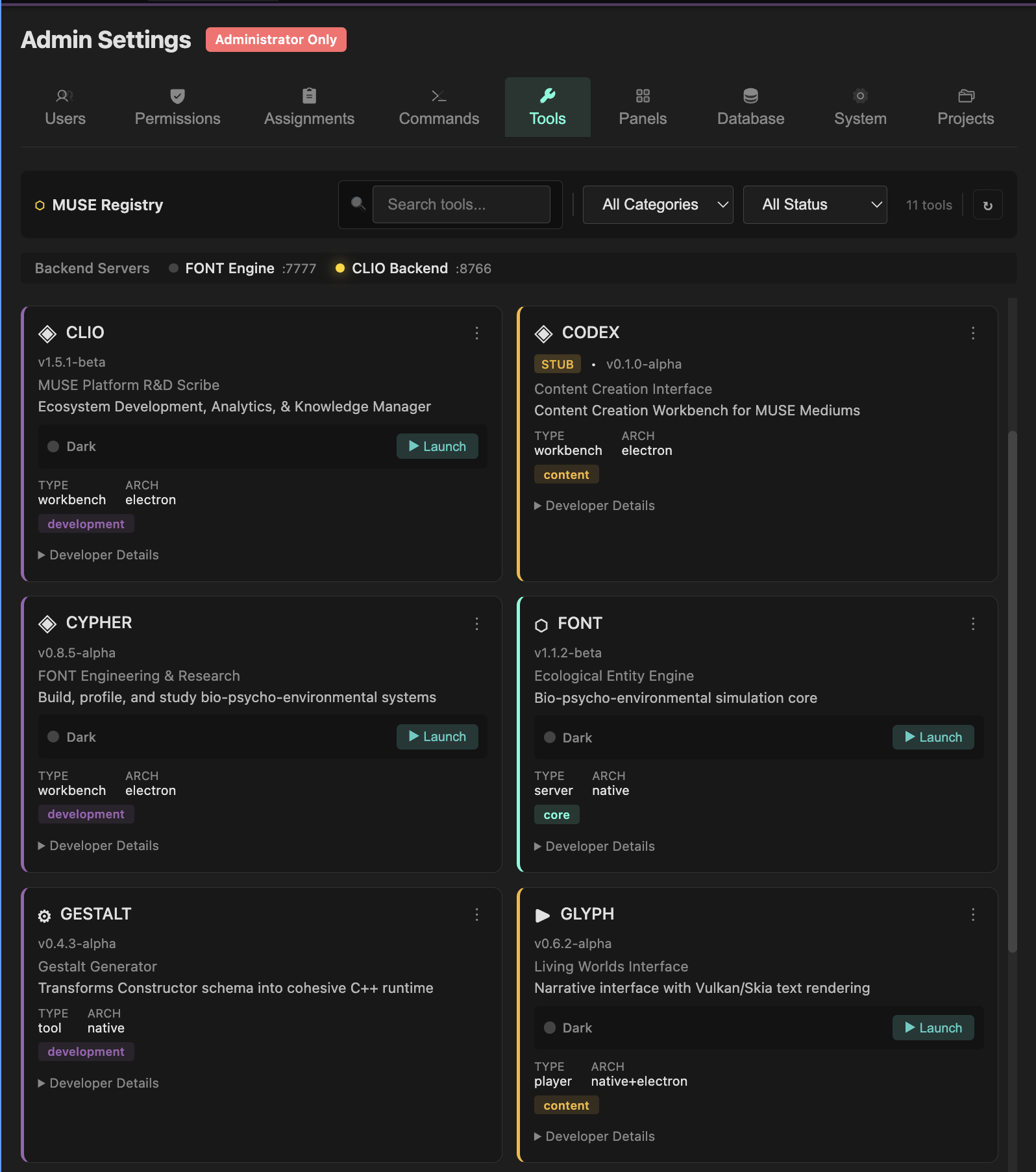
The admin interface manages user roles across the workbench. Each panel and FONT command can be restricted by role, enabling fine-grained access for multi-user environments. Roles include admin, developer, researcher, creative_director, and viewer.
Persistence — 8 Supabase Tables, Workbench Layout Sync
- todo_items — task management with priority/status
- development_sessions — session lifecycle tracking
- terminal_logs — captured terminal output classified by type
- insights_knowledge — rated learnings (1–10 scale)
- common_fixes — solution repository with success rates
- journal_entries — timestamped markdown notes with folder organization
- workbench_layouts — named layout presets synced to Supabase; new machines seed from remote on first launch
- workbench_tab_customs — per-tab color/label/icon overrides synced across sessions
Architecture
GLYPH runs as an Electron application. The Go control plane (port 8766) handles all API requests, Supabase connections, and process management. TESSERA (Constructor node graph) and other specialized editors are embedded as iframes. The FONT simulation engine runs separately as a WebSocket server on port 7777.
- WebSocket IPC to FONT engine (port 7777) for command execution and live simulation state
- Supabase Realtime subscriptions for collaborative editing and live schema updates
- Python subprocess pipeline for SIBYL codebase analysis and GESTALT code generation
- Local SQLite as offline cache and backup queue when Supabase is unreachable
Impact
- Non-programmers can design biological systems that execute at GPU speeds — visual design compiles all the way to CUDA/Metal/Vulkan kernels
- Persistent AI context across sessions improves development velocity for a 5-language codebase
- All roles work from one tool — no coordination cost between kernel engineers, content authors, and researchers
- Automatic session logging creates institutional memory that survives team changes